Friday, May 11, 2012

Media Studies - Reel Bad Arab

Is this acurate in 2012? in Canada?
If so, what other countries use this in their media?

Is this the only stereotype that is villified to this degree? If not, what others and how?

Should this image be changed? How? ...look at all perspectives.

Watch "REEL BAD ARABS - How Hollywood Villifies a People [full documentary]" on YouTube

Monday, April 30, 2012

To Kill a Mockingbird Still Relates

 &


Every year I get to teach the great novel, To Kill a Mockingbird by Harper Lee. Most students enjoy the novel, what I take as my challenge is to show how relevant it is still today. I enjoy this task and take it as an opportunity to make my students challenge their own beliefs and search out answers for why they believe what they believe. I usually find that they strengthen their beliefs and are able to express their beliefs clearer or more persuasively, depending on the final task.

This year I am going to be using the American documentary, Waiting for Superman. This is an analysis of the educational issues in the USA with a very specific point of view. I am careful to explain to my students prior to the film that this is a specific point of view and that they have three jobs during the film; 1. To watch with a critical eye and open mind, 2. To relate the film to Canada and Saskatchewan, and 3. Relate the societal issues raised in the film to To Kill a Mockingbird's theme.


I will be using the following resources to help the students with my three tasks.

#1 - Critical Eye


#2 - Relate Locally


#3 - Relate to To Kill a Mockingbird

  • Assigned Essay


Wednesday, March 28, 2012

Tools I Use - Part 1

After presenting at our iSITs boot camp yesterday, I realized that although I was presenting about educational philosophy change and a change of pedagogy, my audience was caught up in the tools. I maintain that it is not the tool that will increase student learning, but the way you use it and the way you use your f2f time with students.
With that said, this is will be the first of a series of posts on the "cool tools" that I use and how I use them.
1. Edmodo is the most powerful student to teacher tool I use. As a high school ELA teacher, I find it a much more effective way to gather information and assignments, share feedback and resources and incorporate any out-of-school activities we have.  For instance, doing a group research with a class in another country.
2. Twitter is my most powerful professional development tool. This is where my professional learning network (pln) is located. The people I follow and the people who follow me help support me in my professional growth and I am able to continue that growth any day at any time. I also find some of my coolest tools via twitter.
3. Delicious is my organized chaotic resource cupboard. I use delicious to save videos, resources, images and many other "things". I also use this as a powerful search tool and when looking for specific topics that I know members of my pln are interested in, I search there accounts to find what usually turns out to be "the best stuff".
Stay tuned for more to come.

Wednesday, July 6, 2011

The PD that is slipping through the cracks.


A fellow tech colleague has shown some disheartening feelings on the "failure" to teach responsibility with technology in his school. I have felt the same many times and wonder why this is. After recently attending Sylvia Martinez's session at ISTE, “We Need More PD!” and Other Myths about Technology Integration, I think I have found some answers.


© Stockbroker / SuperStock

Sylvia spoke of some of the most obvious PD in new much more efficient and effective forms that we all have access to but are not using.
  1. Virtual Communities - Now most of you reading this blog are thinking, duh, that is what I am doing right now. Yes, that is true, however, we still find ourselves constantly bombarded with the "gather teachers in a room and lecture, or if you are lucky, attempt new teaching techniques to teachers, expecting their "professionalism" to keep them focused, engaged and on task". Sounds a lot like some unfortunate classrooms out there. We need to see the powers that be encourage virtual PD, PLN's for example. (My twitter PLN has taught me and continues to teach me FAR more than any traditional PD.)
  2. Student Provided - This is the one I am most excited about. I did attempt my own version of this this year as a "learn a piece of software and create some help documents and a presentation for a teacher who may be interested" project found here, here and here. However, this was just scratching the surface after hearing Sylvia speak about Generation YES. In this presentation she spoke of incorporating students into the tech plan, allowing their strengths to help guide us as teachers. As many of my colleagues know, if you don't know how a piece of technology works, "ask a kid".
Well then, lets ask kids, put our out dated mentality that we are the knowledge keepers and truly take technology integration adventures with our students.

I will be further exploring this concept using the GenYES documents to guide me.

How do you include your students in tech planning?

...and to get back to my colleagues issue and not having students "buy into" the respectful and responsible use of technology, would the GenYES concepts create a student policed citizenship guided use of technology?

Teaching to the Test


This is a concept that has been thrown around a lot in my school over the past three or four years. It all started when we began talking about PLC's and new assessment practices.

I am dead set against this concept, however, I have not been put in the situation that my job was on the line due to test scores. I try to empathize for teachers in this situation and find myself torn.

I was never more curious how teachers could teach to the test than at ISTE this year. I attended a session, I thought was about writing, and learned very quickly that the framework of this session was teaching to the test. Needless to say I was very dissappointed and walked out of the hour long session after about ten minutes.

What are your thoughts on teaching to the test? Necessity? Tragedy? Cop out?

Is this were Saskatchewan is going?


Monday, July 4, 2011

Does paper still have its place in the classroom?


YES!

I was not expecting to find myself at a session about using paper graphic organizers in the classroom during my "all tech" oriented plan at ISTE. However, I was pleasantly surprised by the Print Cut Fold session.

I have used graphic organizers in the past both successfully and as tragic failures. Most of the failures were due to the vague nature of the organizer I either created or adapted from something I found. Attending this session and seeing how adding a little cutting and folding can really make a boring old organizer into a focused creative one.

Jim Holland, author of the book series "Print Cut Fold", did not only display the creative nature of his graphic organizers, but explained in detail how this can be used in the classroom through all grades. His focus was not so much on printing off an organizer and having students fill it in, but more on including the student in creating the organizer as a study or work tool or a hand in project.

Jim also gave great pointers on how to explain to students some of the simplest tasks, like filling out a text box, triple click and type.

As a representative for not only my school but my school division, I was able to take ideas that will work across curriculum and grades, back to my division and school. I look forward more so to see how my high school English classes will take to some of these activities.

Saturday, July 2, 2011

My ISTE Top 10


After experiencing the ISTE conference, I have came up with ten things I learned, my ISTE Top 10.

  1. I need an iPad. Everyone seem to either have one or was giving one away. Watching the ease of use these devices had convinced me.
  2. It takes a conference like this to create the atmosphere for the greatest PD out there, connections. Getting to meet some of my twitter friends and connecting with some of their friends was by far the best experience and largest learning opportunity.
  3. It is all about the STUDENTS. Hands down, the best part of the conference was visiting the poster sessions and listening to students speak passionately about their education. I saw middle years kids from Mexico show me 3D movies they created, script and all, and 9th graders from Texas present to me their schools 6th graders videos and poems about Texas.
  4. QR Codes are not just the next shiny object. I believe these codes have their place in education, as we see the move to POD's in the classroom. Their appeal is not so much the "shiny new object" but the mystery and excitement of not know where they are going to take you and the convenience roll they play.
  5. In Philadelphia, they don't call them Philly cheese steaks, they are just cheese steaks, and they are delicious.
  6. American conferences are done up right! I was amazed at how much entertainment is incorporated into the conference. I couldn't wait to get to the keynote speakers to see the next Philly talent. Everything from acapella to dancers to drums. This was just short of indoor fireworks. (Check out the drummers at the beginning of the video posted below.) If you are reading this post, you must have and interest in educational technology. Check out the link above and go to San Diego!
  7. There are enough "tech tools" out there to solve every educational problem out there, accept for one HUGE factor. None of these are effective without a passionate teacher behind the tool.
  8. Student Response Systems is what my school needs to look into next. These devices are being made in many different shapes, sizes and capabilities. However, as explained in #2, the information gathered by the teacher could be key. It is the teachers responsibility to gather this quick data and respond accordingly.
  9. Paper has its place. After attending the "Print/Cut/Fold" session put on by Jim Holland, I was reminded of the unique educational worth of graphic organizers and print.
  10. NETs is a guiding document that is not going away any time soon and will not be limited anytime soon. These guiding standards need to be learned and followed to ensure we are engaging our students and ourselves to create efficient, effective, creative and critical thinking citizens.
p.s. Chris Lehman is my new hero. To date, his keynote address is the most inspirational "teacher" speech I have heard. He speaks with such passion and compassion, confidence and humility, leadership and wisdom. Beginning his speech with a poetry slam from students from his school he had to have an incredible speech to justify speaking after the incredible poem by the kids. He did. His words resonated with me on so many levels as he explained not what technology can do to a school, but what passion and caring can.


Monday, June 27, 2011

QR Codes in the Classroom


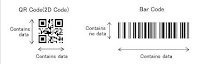
We are seeing these square codes popping up all over the place. What are they? They are, as Marci Lewis would say, a bar code on steroids. These codes are two dimensional unlike the one dimensional bar codes we have seen on products so often.

QR codes use in education... WHY? They are intriguing.

One use, create a website first, intrigue students with an image, QR code beside it, that takes them to a website pre-created and allow them to surf from there. Getting out of their seats, using their phones and waiting to see what the code takes them to is more than engaging. Add your content or theme with the image that gives them a topic or hint.

I see myself getting students to share their writing by attaching an alluring image with a QR code beside it. The QR code would take people to a website/blog with the students writing.

QR codes used as emails for feedback. ie. students found the resource attached helped scan one code that emails me or scan another code that emails me a different code. I am sure a website could be attached rather than an pre-created email, a website that would keep track of clicks.

Another use is the augmented reality. A former student showed me this years ago. I love that it is now becoming a reality. (SMART calls this Mixed reality) Check out Zoo Burst.

This session was great. I was looking forward to this one and it fulfilled my excitement.

Check the following links for more information or apps:

Sunday, June 26, 2011

ISTE 2011 - Philadelphia : Day 1


Well, I made it. My trip to Philly was great. Very hospitable people in both Minneapolis and Philadelphia. I arrived Saturday night, around midnight local time. After a short cab ride, I was at my hotel and ready for bed.

When I got to the Pennsylvania Convention Center Sunday morning, I was shocked by its size. I knew it was going to be big, but the was incredible. Again, the friendly nature of the local people helped to find my way
to registration and get started.

I spoke with a few folks, but mostly sat and watched. Education technologists with every kind of technology you can think mingled. I found it incredibly interesting how few people walked with their technology in front of them, like I see SO many students do. Most would find a spot to the side, then get their technology out.

After some people watching I attended the convention kick off. This was incredible! "Mission Possible" was the theme and that made the kick off a lot of fun. The MC had numerous analogies of teachers and special op's agents, he was entertaining. A capella group kicked it all off with live music and custom music video of the #iste11 conference.

After the kick off, I did some touring, ate my first Philly cheese steak in Philly (my all time favorite sandwich) and took a few pictures. A friend suggested I hit Gino's Steakhouse, but I never made it. I will try tomorrow. As I took pictures and listened to street performers. I found myself drawn to two teenage boys beat-boxing and singing many of my favorite 90's songs, many by Jodeci. After listening to these two for awhile, I headed back to the convention center for the best part of the day.

The student lead poster sessions were AMAZING! I teach public speaking in my ELA class, but nothing I teach can make a teenage public speaker as interesting as these students who spok
e with the key ingredient of public speaking, passion. Listening to these kids speak about learning with different technologies and more importantly, how passionately they spoke about their teachers and their opportunities. I got talking to three guys from Mexico about using Skype in their mechanics classroom. They loved it! The talked about asking questions of students in Canada and the USA and other countries and how they simulate a mechanics business with their international student partners. Mock ordering parts and sharing expertise. I thoroughly enjoyed listening to all of the teachers and students at the poster sessions.

I am looking forward to tomorrows sessions:
  1. Creating a Mobile Learning Initiative Using QR Codes.
  2. Resources for Emergent Literacy Teachers
  3. Google to the Max: The Power Users Guide
  4. Infographics in the classroom as a Creative Assessment
  5. A Gardner's Approach to Learning: Cultivating your Personal Learning Network
  6. International Networking Reception
I hope I make it to all of them. I am very excited about #1, #3 and #6.

More blogs to come or you can follow my tweets at eldongermann


Tuesday, January 19, 2010

Facebook Savvy - A presentation for community parents.

Discussed issues found in our school and community, how they are started and made worse through social networks. This took us into two conversations. 1) Digital Citizenship, which I led and encouraged parents to come to another presentation on that topic. 2) Parent Responsibility, which the parents led. Talked about the parents role in teaching and monitoring their own children. ie. Responsibility, Respect and Safety.


We did have an RCMP officer here to answer legal questions. He was EXCELLENT and gave great insights and suggestions.

Wednesday, January 6, 2010

Am I fighting an winless battle?


I am working on a community presentation on Digital Citizenship. Well, it was on Digital Citizenship. It has lately taken a turn to focus more on a few areas of Digital Citizenship; law, responsibility & respect, and consequences.

There is a serious concern in my community, unlikely a unique concern, of the cyber-bullying and general lack of respect being displayed primarily by some of the youth in our community. My administration often talks to me or asks for help regarding issues they are forced to deal with that are beginning, exploited and publicized through social networking. This gives them a "Facebook is the devil" taste in their mouths.

Obviously I am not saying Facebook is the problem. The lack of knowledge, maturity, respect and responsibility displayed by some students and parents is the problem. I doubt the previous sentence is held to a time restraint.

I do recall a very wise former principal who said a very similar statement, shortly after a parent confrontation in my internship. This was 10 years ago, before social networking existed. I find myself constantly defending Facebook, Twitter, cell phones, laptops, and on.

I truly believe the issues we see in my school are started, escalated and publicized primarily because of; a lack of education in parents, a lack of communication on digital citizenship between parents and children, a lack of supervision and in some cases, a lack of role modeling for the child. If I am correct, than the debates I am constantly in are worth it.

Am I right?

Is there more to this than basic parenting education and responsibility?

How does one get this type of message effectively out to the community?

Do other communities have similar issues? Feelings?

Tuesday, January 5, 2010

head ABOVE water


Well, it has been a long time since I actually sat down and wrote a blog post. I have not abandoned my blog or the technology that I use. In fact, it is partially because of new technology that I have been on a writing hiatus. This school year I began almost all new courses to teach, added a SMARTboard and took on the head coaching position of our high school football team. Adding these to an already full plate proved to be more than I could handle.

After reading Dean Shareski's post, In Search of a Reflective Practitioner, I had a light bulb moment. I realized what was missing. This whole time I thought that my "drowning" feeling was due to the new subject load, adding a SMARTboard in my classroom and other things. However, I now realize the drowning feeling is because I feel less effective.

Why?

I have not reflected. I have not retained new knowledge. I have not "put my thoughts through the writing process". Without this deeper level of thinking, the exact deeper level I strive to get my students to do, I feel that less effective feeling.

So, without further ado, some reflection.

1. SMART board

This is a great addition to any classroom. The possibilities that this tool brings are amazing. However, it does not replace good teaching. Like an advanced overhead, it can only support the learning. There are incredible possibilities of engagement, Darren Kuropatwa has proved that.

I have had some successes in using the SMARTboard in my room. A grammar Jeopardy game on sentence errors was engaging and beneficial, producing a class average increase of 20%. Another success is the day to day organization and "lecture" style use. However, a projector could have done the same.

I do need to incorporate more, student lead activities. I need to get them out of their desks and up to the board. This has proved to a: wake them up, b: give them a unique experience to help them remember a concept, and c: allow for a larger amount of the class to be more involved in large group discussion.

2. ELA 20

This is my first time teaching ELA 20. I quite enjoy the themes that we use to read, write, speak, listen, view and represent with. (Wow, I sounded like a curriculum writer there) Recollections and Anticipation allow for that deeper thought process.

Combine the themes with the PLC focus I have been doing on ELA and I feel more confident now in what I am supposed to be doing than ever. But, as everyone who has had to teach a new course knows, it is a busy journey. The writing I am getting out of my students is more thorough, however, the basic mechanical errors and structure errors are still there. A better focus in this area is a MUST!

I do plan on using my blogging portfolio next term with a new batch of students. I think that if it is planned well enough, the students will be engaged and see the benefits of self/peer/teacher/and world wide editing. They will have the possibility of receiving feedback, both useful and non, from anywhere.

3. Media Studies

This is my first time teaching this course as well. I struggle with what exactly to do, knowing that writing is a more needed priority for the students I am teaching. The analysis of media is interesting, but I believe the course in its entirety needs refining.

As it was with my ELA 20 course, the Media Studies 20 course was a busy journey as well. I found myself constantly using examples of today's more current media. This was key! Relevance was sound and learning was evident.

I had the most engagement when I had my students debate on student selected topics. (BLOW energy drink's unethical marketing scheme, Cell phones use in schools, etc.) The students related best to these topics and our debates were fun, interesting and allowed for deeper learning.

My students are currently working on module 4, which is a major project. I look forward to seeing what their research and products look like. I will also enjoy the deep reflections that will be required of them.

.......

So, that is some of my reflections of this school year thus far.

I am not much for New Year's resolutions, but I do know that if I don't reflect more through my blog, I will be missing out on crucial conversations and self awareness.

Tuesday, October 27, 2009

Glogster

I am currently playing with Glogster in my Media Studies class. I have decided to create Glogs as conversation starters and procedural guides. My obvious intention is to get my class more engaged.

The following Glogs were used to teach and enforce the target of understanding, identifying camera techniques in video and using camera techniques in a storyboard.

I highly suggest trying this interactive poster out. Engagement is key to student buy-in.


Tuesday, July 14, 2009

HOME

In my relaxation this summer, I reivieved a "must watch" tweet from Alec Couros. This is the trailer to the movie, HOME.

I too suggest it as a MUST WATCH!


Friday, July 10, 2009

New Look


My blog will be changing its looks as I change the focus. I will begin to focus more on the conversations through my PLN, teaching, staff, etc.

For now...I am on holidays.

Saturday, June 20, 2009

Blogging Portfolio


This is a concept I thought of trying out at the end of this year. I now plan on using this as my main ELA writing venue and developing an digital writing portfolio. The blog form will allow students to peer edit a little easier, it will allow constant revision and editing and at the same time, allow students to continue writing new articles.

Here is my plan:

1. Students create a Blogger account.
2. Students are given the writing list...a list of differnt styles of writing they will be asked to do throughout the year.
3. Allow time for students to write in their blogs.
4. Near the end of the term, students will create a Googledoc hyperlinking their best writing in each area and explaing why it is their best.

Some examples of articles I plan on doing are:
- Argumentitive Essay
- Career research
- Research Essay
- Short Story
- Descriptive Writing
- Vodcast explanation of peer editing and revising.
- Response Journals
- Pre-writing exercises.

It will be important to teach my students to label or tag their articles properly, since they will need to access old articles easy. A few of my students have begun this process here and here.

Tuesday, May 26, 2009

Privacy - Students Perspective

I have been following Alec Couros since I began working in the social media side of teaching.  His work always hits home for me and helps me understand things I find hazy. Alec has been in an ongoing conversation that began with a very unpleasant experience, the Flickr Perversion post.

In Alec's post, in particular, the argument between Alec and Dirk, some great points have been raised.  Although I am openly biased here, I agree with anAdd Imaged act the same as Alec. In short, I believe that it is our duty as "educational leaders" and parents to understand the openess of the internet, and do our best to control/influence our digital footprints and those of our children and possibly even students.  I, too, and discreet about what I post, but I do put my children and students on the internet.

This brings me to my conversation today.  I shared Alec's comment stream with my grade 10 class and had them discuss it in a respectful and safe manner, using our microblogging platform, Edmodo.  A number of students had great points and insights. The class was pretty evenly split between those you agree with Dirk, those who agree with Alec and those who see both sides.  A few comments stood out and I thought I would share.

Morgan - There are risks you take with putting things on the internet. Alec and Dirk both had fair points and in my mind both were right. We all take risks putting stuff on and are aware that there are people who are sick minded. You don't have to be on the internet to have a person who is not in the right state of mind do somthing that is absolutley disgusting. The fact that Dirk questioned Alec's parenting is stupid, Alec knew all the risks and still did it. Who cares if Dirk didn't agree with this. Everyone has a picture in a bathing suit and the thought that there are people in our society that have to take pictures of innocent people is absurd. Now a days everyone has pictures and I gurantee there are pictures of Dirk that he may not want on there in the future. We all take risks and it is innevitable eventually our lives will be on the internet.

Courtney - I believe that you should put your information online so that you what you have online. I side with Alec's belief. You should put your information online because it is better than fake information where people will discover what is real anyways. At swimming pools, people are in their bathing suits so if there is a picture online, it isn't that much different.

Kimberley - I agree with both sides of this arguement. I agree with Dirk when he stated that there is no reason for Alec to be surprised that someone has favorited a picture of his daughter. The fact of the matter is that there are sick people out there and you are taking that risk if you choose to put pictures of your family on the internet. I only agree with Alec in the sense that he is a father and has pride in his family. It was not smart of him, however, to think that he could put a picture of his daughter out there and then get upset over someone favoriting it. Sure, it is not morally right for a person to only favoite pre-teen pictures of girls but he made the decision to make the photo public. If he did not want this to happen, he should have thought twice before posting it.

Morgan replies to a previous message - Tyler getting your pictures on the internet can be done without you even putting them on. People can take pictures where ever they want. The man who favourited these picture's probably has taken pictures of innocent girls without any consent.

After our conversation, I showed the students a number of the links from above.  I showed them many of the pictures and videos I have put online. Many of these photos are of my family, children the same age as Alec's, and the very students involved in this discussion. Unfortunately, our conversation was cut short with the end of class.

I did hear a number of students discussing this topics a few hours later in the lunchroom. Their discussion, although based on the Flickr Perversion blog post, had turned to their feelings about their own pictures posted online.  

I look forward to our conversation tomorrow when I ask them to analyze their own digital footprints, including the photos and other information that is put online by others, like their teachers.

Stay tuned! 


Monday, May 11, 2009

My PLC Reflection


This school year was much like that last.  As you know, last year my learning curve sky rocketed with my position on the iSITS committee and our school network administrator.  This year has been much the same.  The interesting thing is that the focus of my technology learning and the PLC’s our school has focused on go hand in hand.

However, the PLC learning did not start off as fast as the technology.  It wasn’t until we got together with division III and IV ELA colleagues that the PLC concept made sense to me.  I saw its relevance right away, the process made sense but how it related to my classroom was confusing. As the division III and IV teachers began, it began to make sense and again, my learning curve sky rocketed.

Our common ELA language came by the ELA 30 teachers initiative and we created our standards. Once we had this common language, we began to break down our standards in the PLC format.  This was interesting in how we analyzed the “important” parts of ELA, not all came from our curriculum.

Recently, we have been doing more of the collaboration part, in the aspect of, “where do we go from here”.  This is where I relate so much to the technology learning, although it has been a major part throughout, whether it be study hall or research.  I researched how to bring the big ideas into my classroom and received lots of ideas.  I bounced these off of my colleagues and with the help of them and the Saskatoon PLC format,  I have figured out how we will create, unit-ish plans that will incorporate our standards and big ideas.  

Tuesday, April 21, 2009

Impressed with Empressr


Empressr is the newest presentation tool I have been working with.  I found this program to be a powerful and easy to use presentation tool that almost anyone could use.

The program offers many of the regular features that other presentation tools have; text, charts, shapes, alignment, uploading and backgrounds.  There are a few extra features of this program I would like to talk about: Interesting transitions, reflections, the import tool and the tech team.

The transitions offered in this program have a nice new look to them.  So for those of you getting irritated with the powerpointless "glass smash" for every transition, there is something new.  Adding the transitions is ridiculously easy as well.

The reflections feature creates a cool looking reflection of images.  Layered, this looks interesting and appealing.  Engaging you audience is always so important, have new interesting transitions and image reflection alone makes the program worthwhile.

The import tool allows one to search for youtube videos, flickr images, google and yahoo.  Once a url is found, you can automatically embed that item into your presentation page.  This makes using social media in presentation crazy easy!  Plus, if you are inserting your own material, you do not need to get the raw file, but can access your own accounts.

The final feature is the tech team.  Hours after I added a question to the support page of the Empressr site, @bryanthatcher contacted me through twitter asking what was wrong.  I explained it to him, in under 140 characters, and he informed me the guys would look at in the morning.  Today, I get a tweet from @globalcitizen asking me to follow him and he will DM me the detail of my problem.  I got back to @globalcitizen and within an hour we were in a Skype chat and he was explaining thoroughly and easy to understand.  

@globalcitizen was extremely easy to chat with, informative and encouraging.  I was given some extra feedback on my presentation design which was also very beneficial.  The fact that tech support is that fast and easy to understand is what sets this program apart from others.  

I would recommend anyone and everyone to try out Empressr.  

My experience was great!